
Bookkeeping and accounting software
Accounting Software for Real Estate Agents: 9 Tools Compared

CEO · Aug 23, 2026
Heidi DeCoux is the founder of Cashflowy, an AI-powered bookkeeping platform, and has worked with thousands of self-employed professionals to simplify finances and improve profitability.

Ten years with accounting software should be long enough to trust your books. Before switching to Cashflowy, Dallas-Fort Worth agent Ryan Blauser had used QuickBooks for almost a decade and still reviewed every transaction by hand. “The biggest pain point is not knowing what you don’t know if you’re not an accountant,” he said.
That is the real test of accounting software for real estate agents. Importing bank transactions is easy. The harder part is handling irregular commissions, separating business and personal expenses correctly, knowing what to have set aside for taxes, tracking mileage and listing costs and keeping the books ready for tax time without requiring an agent to configure a generic accounting system around the business.
This guide compares nine options for commission-based solo agents, not landlords, property managers or large brokerages. You’ll see what each tool handles well, where you still need manual work and which one best fits the way an independent agent actually earns and spends money.
See also: Practical tools for self-employed accounting and bookkeeping.
Why accounting for real estate agents is unique
- Commission income isn't monthly revenue. Most accounting software assumes money arrives on a fixed schedule. Monthly retainers, hourly invoices, recurring invoices that go out on the first. But your income arrives irregularly, sometimes three in a week and then nothing for six. A dashboard built for steady cash flow will tell you that August was extraordinary and September was a catastrophe, instead of showing you how to manage your money during the slower months.
- Gross commission is not your income. Say a deal produces $15,000. You still need to pay broker split, referrals, transaction fees and desk fees. In the end, you're left with $9,000 before taxes. If your accounting platform just records the $9,000 deposit, your financial reports understate both your revenue and your costs. Then, in January, your broker issues a 1099-NEC for the gross figure, and nothing reconciles. You have to record the split as an expense line.
- Nobody is withholding anything. According to studies, 86% of realtors are independent contractors at their firms, meaning that there's usually no withholding or employer match. Whatever you set aside for tax time, you set aside yourself. That's why a running tax estimate is crucial.
This is general educational information, not tax advice. Talk to your tax professional about your specific situation.
See also: Real estate tax deductions checklist
Most real estate accounting software is not built for you
The market is saturated with property management software.
Tools like Buildium, AppFolio, Yardi, and Stessa handle rent collection, rental income tracking across multiple properties, lease management, tenant communication, vendor payments, accounts payable, and property-level accounting that shows net operating income per unit. But these are features for real estate investors not real estate agents.
Then there are solutions for real estate developers and REITs that need enterprise resource planning platforms like Sage Intacct, which allow multi-entity consolidation, dimensional reporting, multiple currencies, and audit trail requirements that a solo agent will never encounter.
None of that are designed for a solo real estate agent.
Key features to look for as a solo real estate agent
Focus on whether the software can keep commission-based books current and make the resulting numbers useful:
- Bank feeds and reconciliation: Look for automatic transaction imports, categorization, review flags and options to import missing statements without manual data entry.
- Separate out your business and personal expenses: Automatically categorize them, allow you to change categories easily, and update your tax reports accordingly in real time so you’re tax-ready year round.
- Commission bookkeeping: The software should let you record commissions, brokerage splits or caps, referral fees and transaction costs separately when needed.
- Real estate categories and receipts: Look for a customizable real estate chart of accounts and the ability to attach receipts to individual transactions.
- Take-home and tax visibility: Check whether current income and expenses influence an estimated owner’s pay figure and running tax reserve, without leaving you to rely on the bank balance.
- Cash flow forecasting: You need to see whether cash from recent closings can cover the next period even if no closings come up.
- Reports and accountant access: The software should provide a profit and loss statement, balance sheet, trial balance and general ledger, with exports or direct accountant access.
- Human support: Check whether you also get access to human help with categorization, reconciliation and reports, and whether that support costs extra.
Also confirm which capabilities are included in the advertised price and which require an upgrade or additional fee.
Accounting software for real estate agents compared
| Tool | Best for | What stands out | The trade-off | Pricing |
|---|---|---|---|---|
| Cashflowy | Solo agents wanting bookkeeping and financial guidance | Real estate categories, Tax Reserve, Owner’s Pay, forecasting and human bookkeepers | No payroll or property-level accounting | $39/month or $390/year |
| Tabby | Mobile-first bookkeeping | Agent categories and quarterly tax estimates | No bookkeeper, Owner’s Pay or forecast | $29/month or $228/year |
| Realtyzam | Deal-level tracking | Commissions, expenses and mileage by sale | Limited financial reporting and guidance | $14/month or $138,96/year |
| QuickBooks Online | Conventional accounting with CPA access | Full accounting and mileage tools | Real estate workflows require manual setup | From $38/month+ |
| FreshBooks | Agents who also invoice clients | Invoicing, payments and mileage tracking | Not designed around commissions or closings | From $23/month+ or $276/year |
| Hurdlr | Mileage and tax tracking | Automatic mileage and live tax estimates | Full accounting requires Pro; no closing workflow | From $9.99/month or $100/year |
| AgentXpense | Commission tracking by closing | Splits, referral fees and deal expenses | No full financial statements or live tax guidance | $14/month or $119,88/year |
| Wave | Basic general accounting | Financial reports and optional bank automation | No real estate workflow or cash guidance | $19/month or $190/year, Advisors for an additional $149/month |
| Xero | Larger or more complex businesses | Full accounting and reconciliation | Manual real estate setup; no pay or tax guidance | From $29/month+ |
The 9 best accounting software options for real estate agents
1. Cashflowy
Cashflowy for Realtors is an AI bookkeeping and financial coaching platform built for U.S. real estate agents who run one-person commission businesses. It connects bank and credit card accounts through Plaid and supports more than 12,000 financial institutions. New transactions import daily and are categorized automatically, flagging anything that needs review. Cashflowy also supports reconciliation and PDF, CSV or XLSX statement imports for older activity.
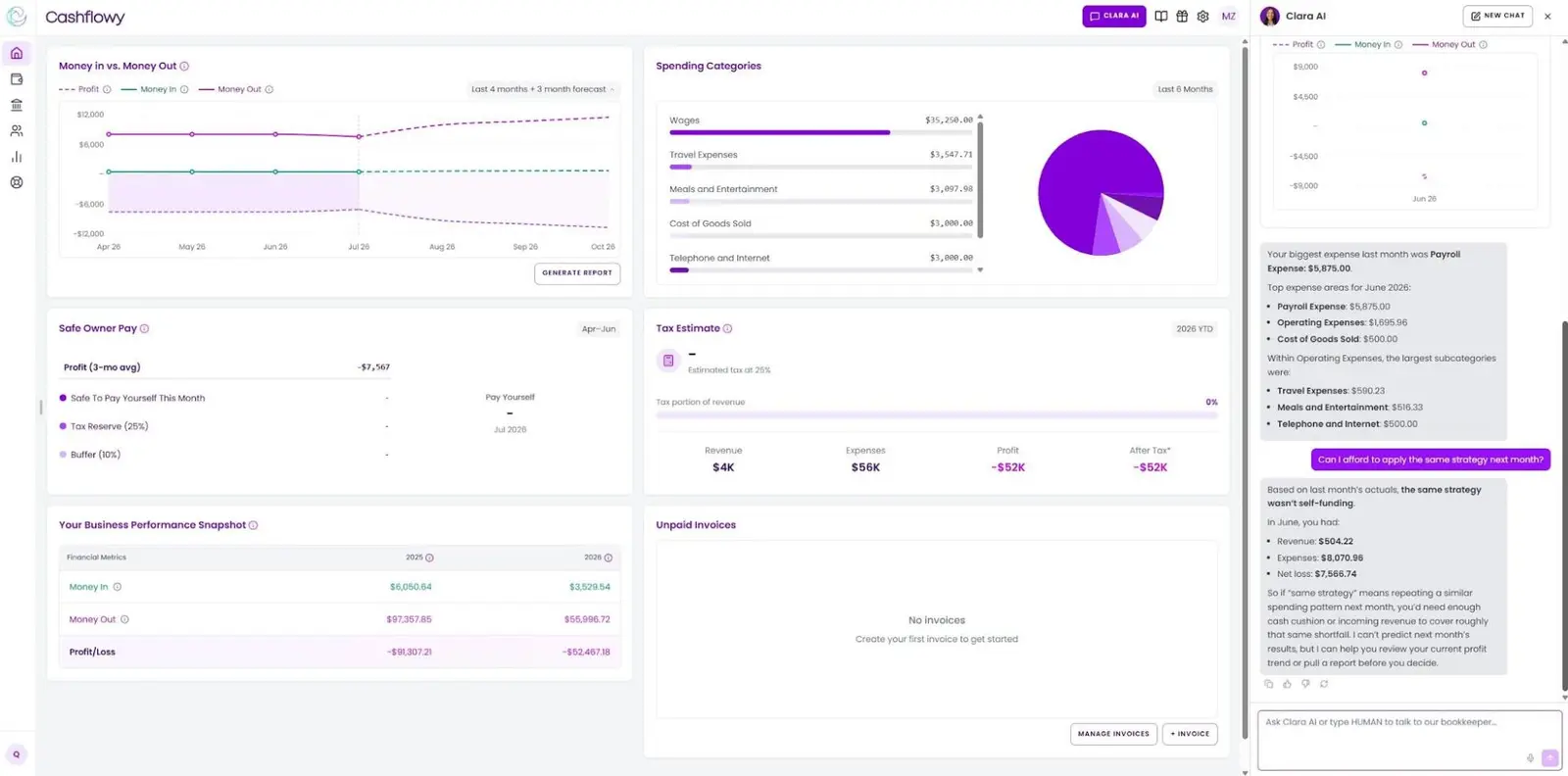
Its real estate chart of accounts organizes commission income and agent-specific costs such as:
- brokerage splits and caps,
- referral fees,
- lead generation,
- E&O insurance,
- desk and association fees,
- open houses and closing gifts.
The dashboard shows income, expenses, profit and cash flow. It calculates a suggested Owner’s Pay based on the last three months of categorized revenue and expenses, minus the estimated Tax Reserve and business buffer that covers regular costs. The estimated Tax Reserve updates as income and expenses change. The 90-day cash-flow forecast shows whether your closings can cover a slower period.
Cashflowy answers questions based on your current account data. It can identify where spending increased or show you how much was spent in a particular category. Trained bookkeepers are also available via unlimited chat and scheduled private meetings at no additional cost. They can help correct categories, reconcile accounts and explain reports.
Cashflowy also gives you profit and loss statements, balance sheets, trial balances, general ledgers and account balance reports. Reports can be exported as PDF or CSV, or you can invite your accountant to access them directly.
Remember Ryan Blauser from the intro? After switching to Cashflowy for Real Estate Agents, he got 524 organized transactions spanning two years of uncategorized activity in seconds. He also got a real estate chart of accounts that matched how he actually spends, plus a human bookkeeper to contact whenever a category needed a second look. In his words, the difference was “simplicity + efficiency.”
Start your seven-day free trial and see your books without second-guessing every category.
The trade-off: Cashflowy doesn't process payroll, manage inventory, provide property-level rental accounting or file tax returns. It's designed for an individual agent’s commission business, not a brokerage with employees or an investor managing rental units.
2. Tabby
Source: AppSumo
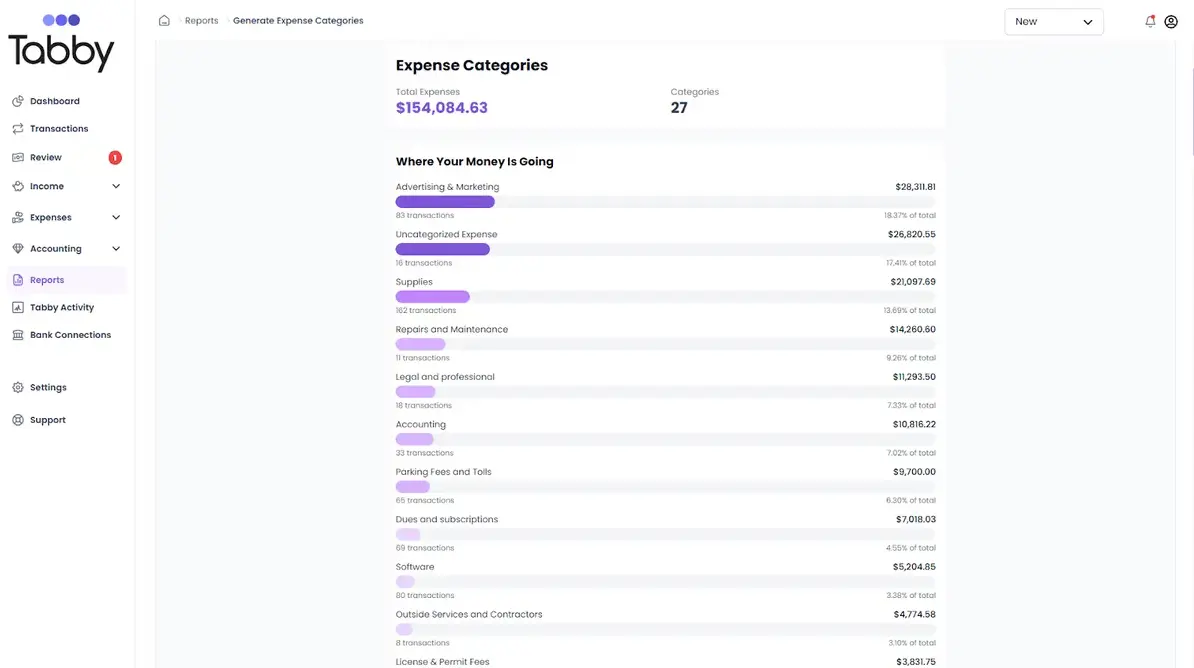
Tabby is a mobile-first AI bookkeeping platform for self-employed professionals, with a workflow tailored to independent real estate agents. It connects with U.S. and Canadian financial institutions through Plaid and can import transaction history. The AI categorizes transactions and learns from corrections. Agents can also connect mixed-use personal accounts, then review which activity belongs in the real estate business books.
The real estate chart of accounts includes commissions, MLS dues, signage, E&O insurance and client gifts. You can scan receipts via the mobile app and match them to transactions. The dashboard tracks income, expenses and cash flow. Tabby produces profit and loss statements and tax-ready reports that you can export as CSV, QBO or PDF.
The trade-off: Tabby includes email and chat support, but not ongoing review or private meetings with a bookkeeper. Features don't include an owner’s pay calculation or a 90-day cash-flow forecast. Users report duplicate transactions, settings reverting and other stability problems.
3. Realtyzam
Source: Software Connect
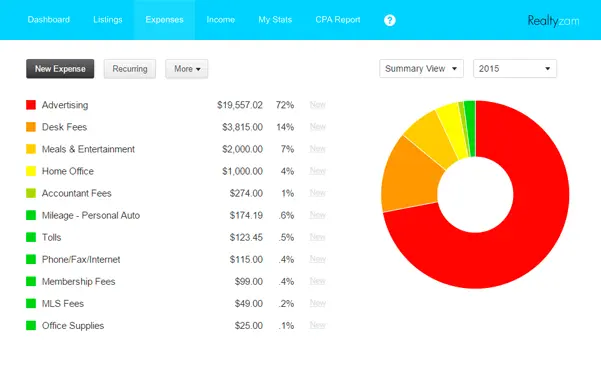
Realtyzam narrows real estate accounting software to the records an independent agent needs to maintain: commissions, deal-specific expenses, broker fees, mileage and receipts. It can show profit and expenses for each sale. You can also input client details, documents, notes and reminders connected to the transaction.
Linked bank and credit card accounts for supported institutions update nightly. Realtyzam categorizes transactions based on your defined rules, with custom categories and subcategories. If you prefer not to link your accounts, you can import bank files instead. Receipt capture via the mobile app is available, and you can link receipts to expenses. You can also generate quarterly or year-end reports for tax preparation.
The trade-off: The narrow scope makes Realtyzam approachable, but also limited. It records past income and expenses, but doesn't calculate tax reserves or a safe owner’s pay, forecast cash flow or provide a complete view of your financial position. Support is available via email.
4. QuickBooks Online
Source: LiveFlow
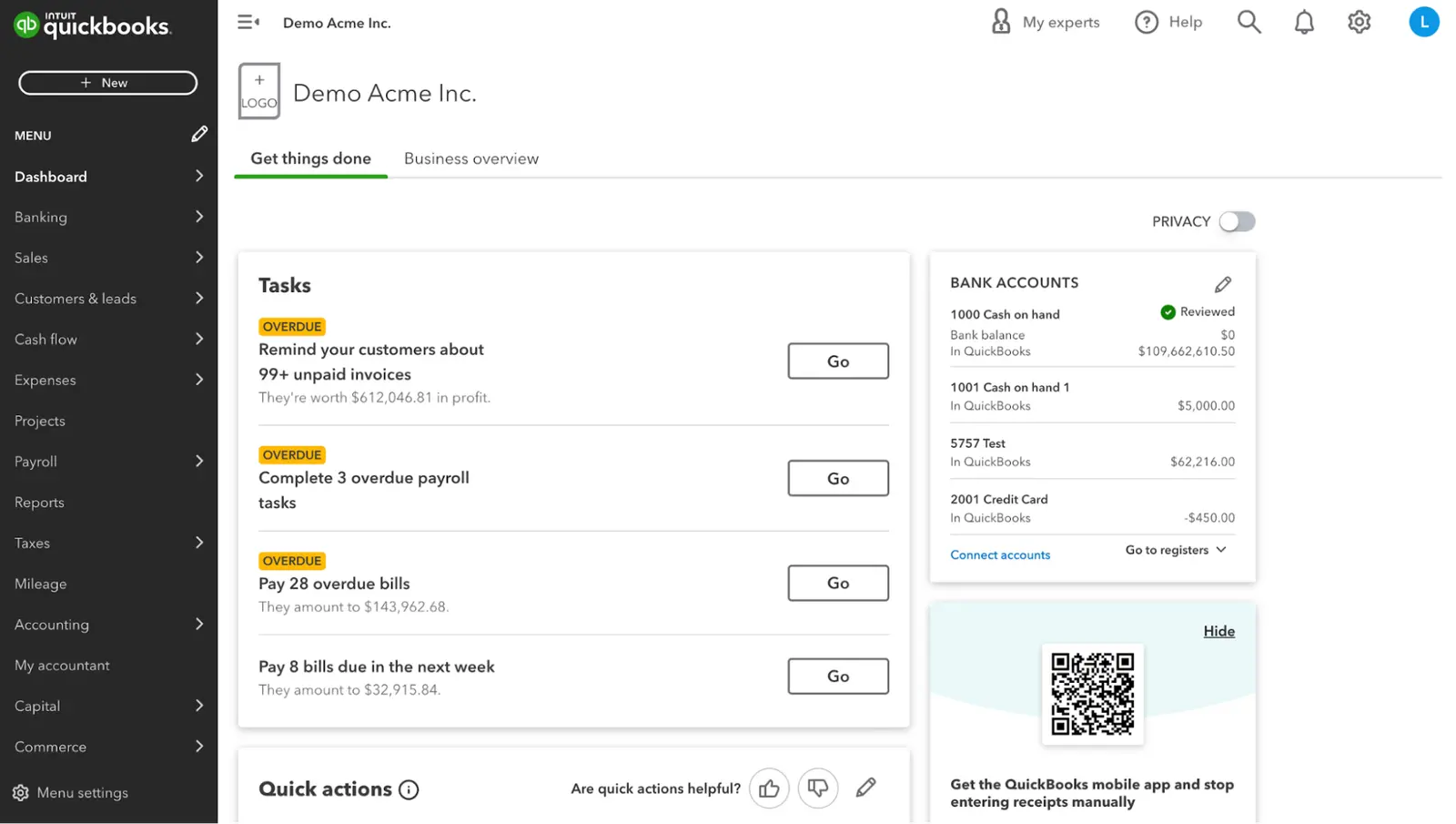
If you're considering QuickBooks for real estate needs, the main thing is to choose the right product. QuickBooks Solopreneur is designed for one-person businesses that file Schedule C. It imports bank and credit card transactions, learns recurring expense categorizations, captures receipts, tracks mileage through the mobile app and separates business spending from personal transactions. Users can also generate profit and loss reports, monitor cash flow and organize records for tax filing.
Solopreneur uses predefined Schedule C categories. Agents who want to customize their chart of accounts around commissions, brokerage splits and real estate expenses need QuickBooks Online Simple Start, which also adds accountant access and a balance sheet. Tracking profitability by listing or property requires another step up because class tracking and project profitability are limited to QuickBooks Online Plus and Advanced.
The trade-off: QuickBooks' flexibility suits a solo agent or their accountant who wants a conventional accounting system with access to a broad app ecosystem. However, the real estate workflow needs configuration and doesn't come out of the box. QuickBooks has no dedicated commission-split feature, so gross commission income, brokerage charges, referral fees and transaction fees must be recorded consistently using accounts, classes or projects. The platform focuses more on recording and reporting than on deciding how to use incoming cash.
See also: QuickBooks alternatives
5. FreshBooks
Source: Tech.co
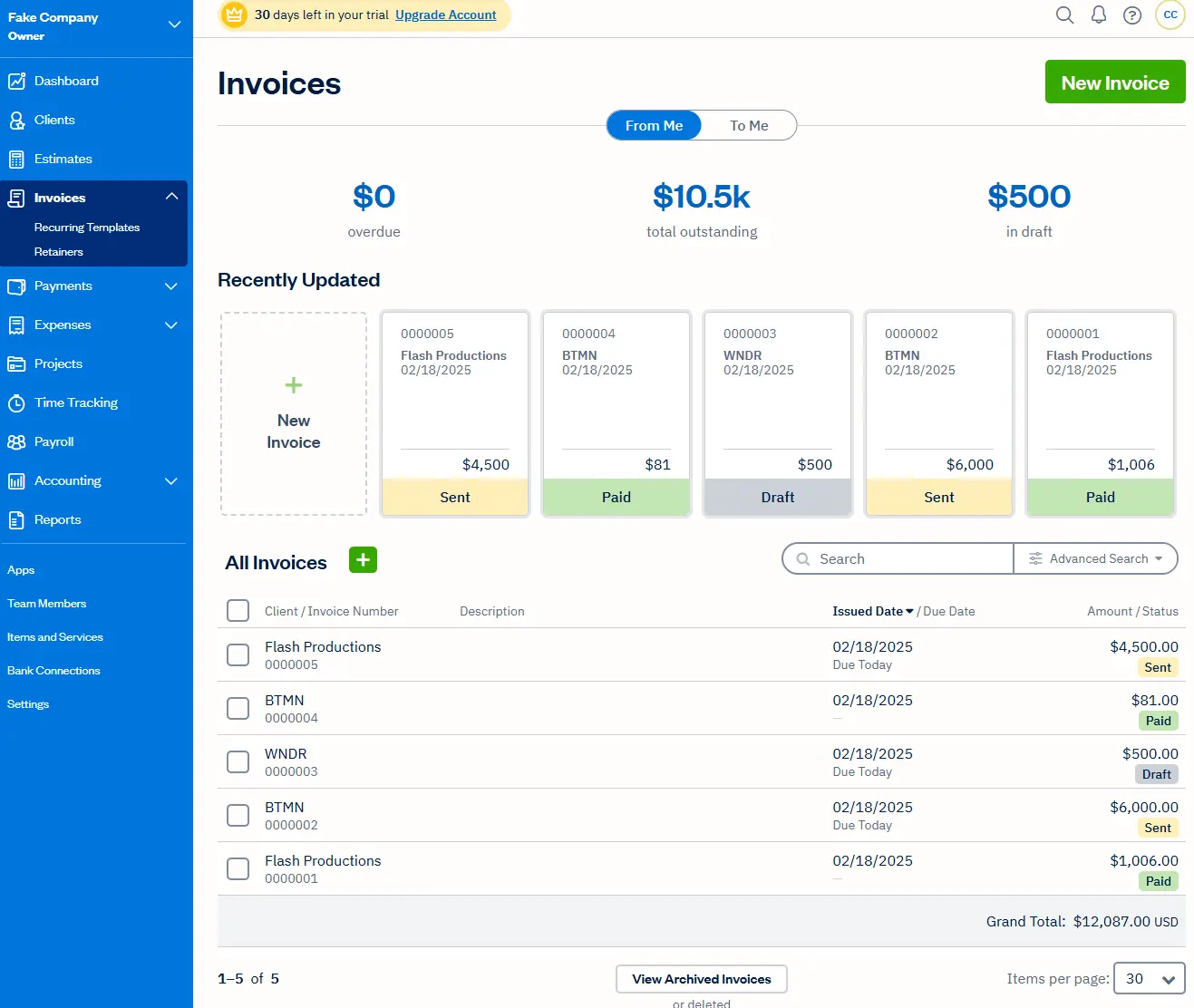
FreshBooks makes the most sense for a real estate agent who also charges for consulting, property marketing or another service billed directly to clients. The workflow includes steps from estimates and proposals to invoices and payment collection. It supports recurring invoices, deposits, time and project expenses, partial payments and automatic reminders, with online payments available.
The platform imports expenses from connected accounts and automatically tracks mileage via the mobile app. Basic features include expense tracking, automated bank imports and tax-time reports, but invoicing is limited to five clients and excludes accounting features. The higher plan includes bank reconciliation, double-entry accounting reports, accountant access, project profitability, accounts payable and receipt scanning that captures the merchant, total and taxes.
The trade-off: FreshBooks is structured around billable clients and projects. Most real estate agents receive commission through a closing or their brokerage rather than invoicing buyers and sellers, so many of its strongest billing tools may go unused. FreshBooks can record commission income and brokerage expenses, but it doesn't provide a dedicated workflow for connecting gross commission, brokerage splits, referral fees and transaction costs to a closing. It also doesn't calculate a tax set-aside or determine how much is safe to pay yourself.
See also: FreshBooks alternatives.
6. Hurdlr
Source: Shopify App Store
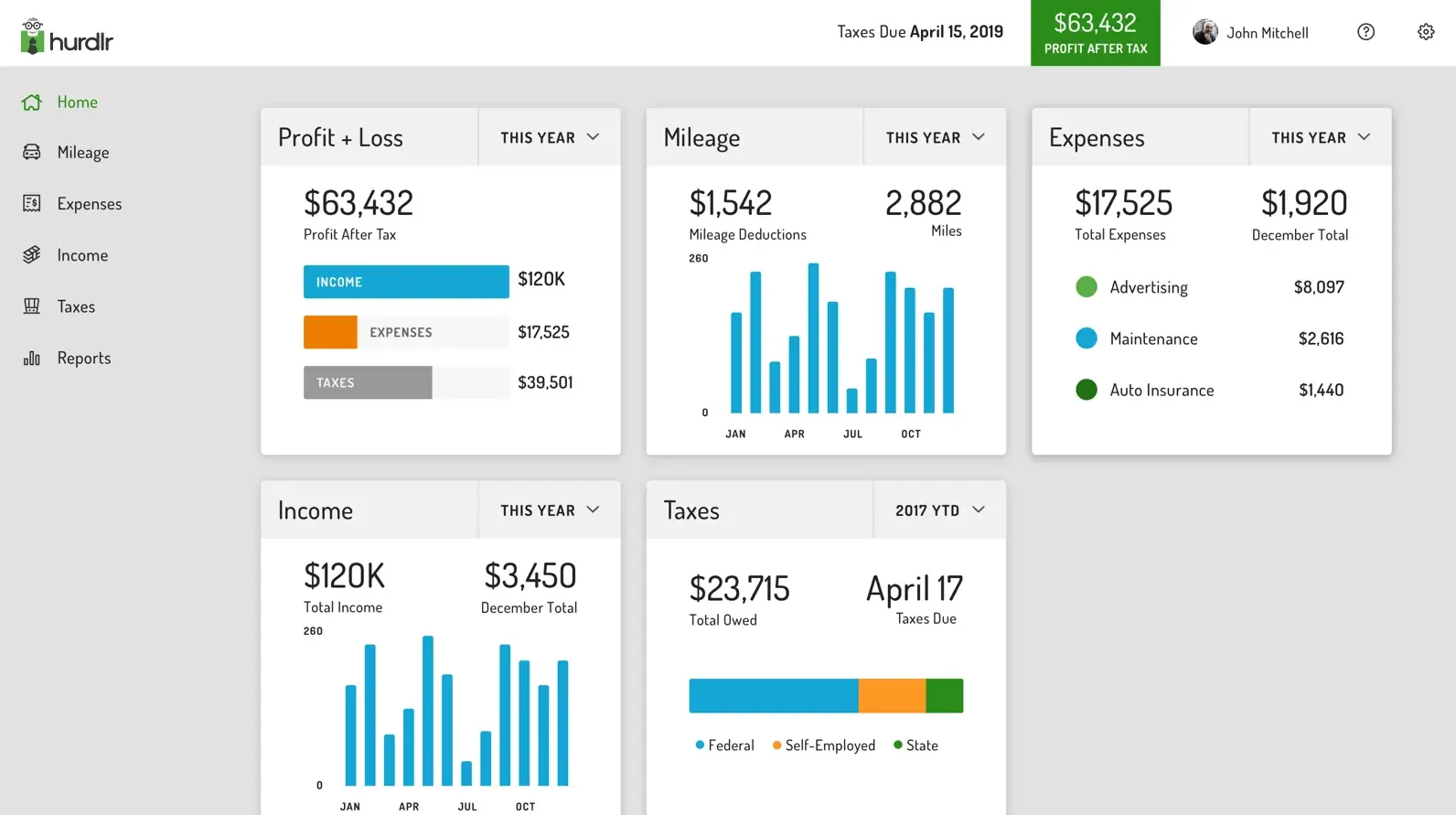
Hurdlr is most useful for tracking mileage. The Premium plan detects trips automatically, separates business and personal mileage and learns repeated routes. It can also compare the standard mileage deduction with recorded vehicle expenses.
Linked bank and credit card accounts automate income and expense tracking. You can store receipts with individual transactions. Tax estimates update as income, expenses and mileage get classified. Hurdlr also sends payment reminders and exportable tax reports, including Schedule C information.
The free plan includes semi-automatic mileage tracking, manual financial tracking and real-time tax estimates. Premium adds fully automatic mileage and financial tracking, and Pro adds invoicing, bank reconciliation, a chart of accounts, general ledger, balance sheet, journal entries and accountant access. One federal and one state tax filing are also included.
The trade-off: Premium includes tracking and tax features, but not a complete double-entry accounting system, so some agents may still need to pair it with separate accounting software. Pro closes that gap but remains a general-purpose system. It doesn't connect gross commission, brokerage splits, referral fees and listing expenses within a dedicated closing record. Pro can record an owner’s draw correctly, but it doesn't calculate how much is safe to withdraw.
7. AgentXpense
Source: AgentXpense
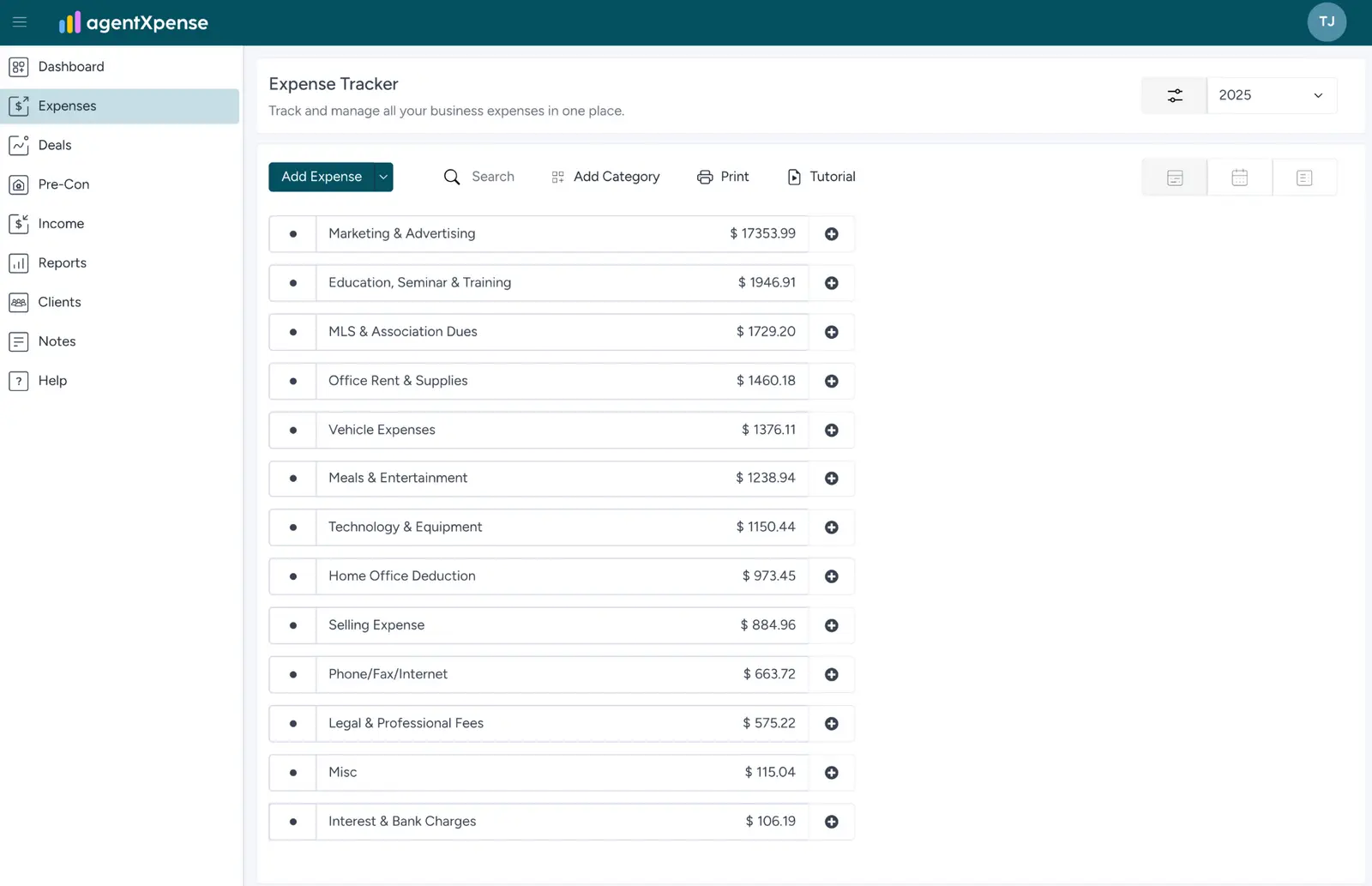
AgentXpense starts with the deal: for each pending or closed transaction, you can record the property or client, closing date, gross commission, brokerage and team splits, referral deductions and net commission. You can also link expenses to specific deals, so you can compare expected pay with the actual amount received and see what each completed closing costs.
Expense tracking in AgentXpense includes preset categories, including MLS and association dues, marketing, vehicle costs, education, selling expenses and home office costs, but you can add or remove those. The AI receipt scanner extracts the vendor, date, amount and tax from uploaded receipts. Bank CSV files are mapped automatically. The platform also stores client information and produces commission, income, expense, net income and tax-oriented reports.
The trade-off: Bank reconciliation is basic and not a primary focus. Features don't include a general ledger, balance sheet, accounts payable or invoicing. Its profit and loss, commission and expense reports can support tax preparation, but agents who need a complete set of statements may still require another accounting system. AgentXpense also doesn't file tax returns, calculate a live tax set-aside, or determine how much is safe to pay yourself.
8. Wave
Source: Software Advice
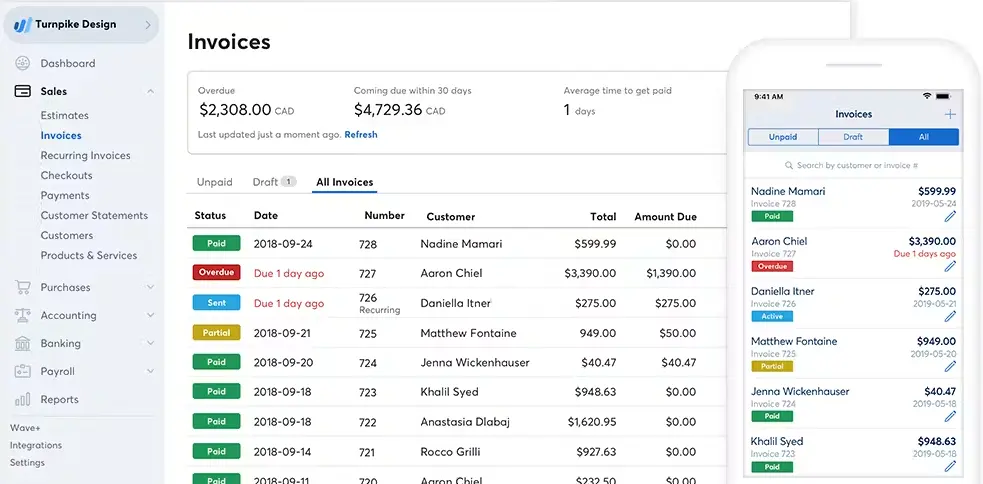
For a new real estate agent, Wave’s free Starter plan can work for basic expense tracking, unlimited bookkeeping records, bills, invoices, estimates and standard reports such as profit and loss, balance sheet and cash flow. This plan doesn't import or categorize bank transactions automatically, but agents with a manageable number of transactions can keep proper books without a monthly subscription.
The paid plan reduces much of the routine bookkeeping work. Connected bank and credit card accounts import transactions through Plaid, and Wave automatically merges matching records and categorizes activity. You can upload receipts for advertising, listing photography and other agent expenses through the mobile app, desktop or email, then convert them into bookkeeping records and match them to account activity. Pro also supports additional users with different permission levels, allowing an accountant or bookkeeper to work directly in the same books. You can add bookkeeping and financial guidance, but it costs $149/month.
The trade-off: Wave is general-purpose accounting software without a real estate-specific workflow. Commissions, brokerage splits, referral fees and listing expenses require custom categories, and there is no native deal-level view connecting them to a property or closing. Mileage tracking requires a separate integration. Without the paid automation, importing, categorizing and documenting transactions requires more manual work as volume grows. Even after upgrading, Wave does not calculate how much to reserve for taxes or how much you can safely pay yourself.
See also: Wave alternatives.
9. Xero
Source: Xero
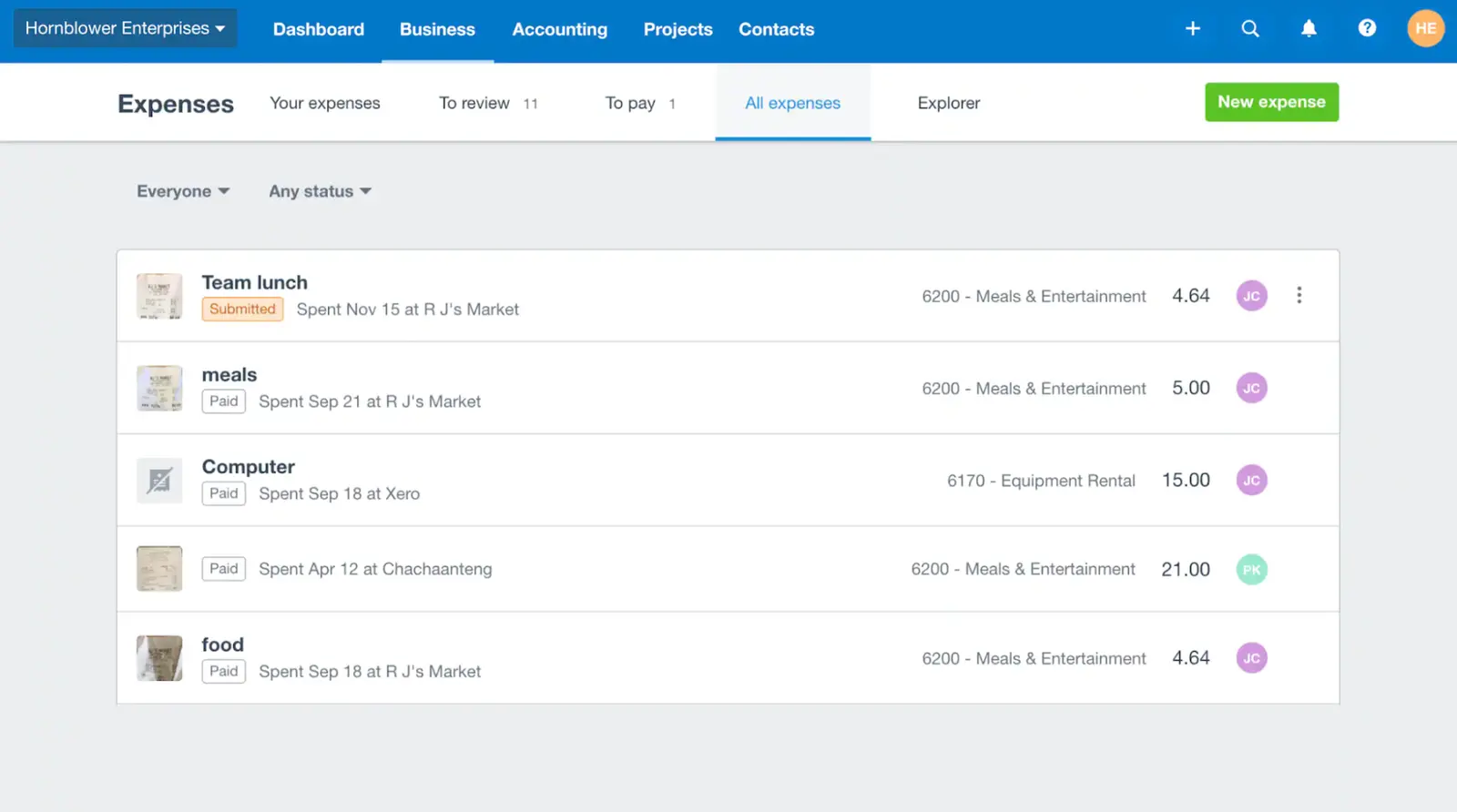
Xero gives a solo agent a full accounting system, not just a lightweight income and expense tracker. Bank feeds import transactions, reconciliation tools suggest matches, and Smart Document Capture extracts information from bills and receipts. Once transactions are categorized, Xero produces standard financial statements, including profit and loss, balance sheet and cash flow reports.
The platform can forecast cash flow, track time and costs by project, manage expense claims and record mileage. Xero allows room to grow for an agent who plans to hire staff or build a brokerage, but a one-person business may use only a small part of the wider system.
The trade-off: Commission income, brokerage splits, referral fees and transaction costs require accounts or tracking categories that you'll need to configure. There's no native view showing the gross commission, deductions or net income from each closing. Xero also doesn't calculate how much to reserve for taxes or how much the agent can safely take as owner’s pay. The support team helps with the software, but it doesn't provide ongoing bookkeeping or financial guidance.
See also: Xero alternatives.
Choose software for what happens after a closing.
Real estate-specific tools make commission income and common agent expenses easier to organize, but many stop short of complete financial reporting or guidance. Traditional accounting platforms give you solid books, but you must configure the real estate structure manually, and someone still has to interpret the reports.
For a solo agent, the most useful outcome is knowing what each closing left after expenses, what should be reserved for taxes and what you can safely pay yourself without leaving the business short before the next commission. Cashflowy combines automated bookkeeping and a prebuilt real estate chart of accounts with recommended Owner’s Pay, an estimated Tax Reserve, a 90-day cash flow forecast, Ask Cashflowy and unlimited access to human bookkeepers.
Connect your accounts and view your dashboard in as little as six minutes. Start your free trial here.
Frequently Asked Questions
What accounting software do most real estate agents use?
Can I use QuickBooks as a real estate agent?
Do I still need a bookkeeper if I use accounting software?
How do real estate agents track commission splits?
Keep reading

Best Accounting Software for Freelancers in 2026: 7 Options Compared
Compare seven freelance accounting software options by expense tracking, invoicing, bank feeds, cash flow, tax readiness and key limitations.

Most Practical Self-Employed Accounting Software, Bookkeeping and Finance Tools
Compare the best accounting software and bookkeeping tools for the self-employed. See features, limitations, and which option fits your business.

QuickBooks for Real Estate Agents: What It Handles, What It Misses
See how QuickBooks for real estate agents handles commissions, expenses and taxes, which plan works for you and when you may need another tool entirely.