
Bookkeeping for freelancers
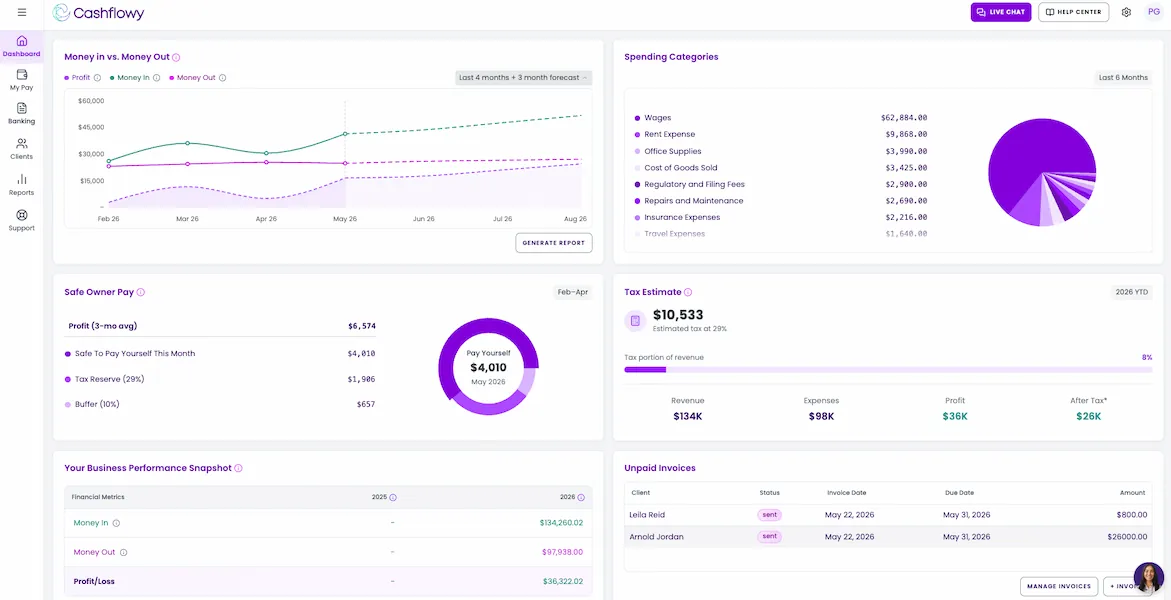
You know what every project is worth. But after expenses, taxes, unpaid invoices, and a slower month ahead, how much of that money can you actually keep?
7 day free trial · $0 charged today · Cancel anytime
You’re great at helping clients. The business side shouldn’t slow you down
Freelance income can look healthy while leaving important questions about payments, expenses, taxes, and personal pay unanswered.
You finished the work.
But the money still hasn’t arrived.
Some clients pay the day the invoice is sent. Others take weeks. Retainers, milestones, and final payments each land on their own schedule.
A big project doesn’t always leave a big paycheck.
The invoice looks great. What you keep is another story.
Software, contractors, processing fees, and the tools you rely on every day quietly take their share of every project.
The bank balance looks healthy.
But some of it already has a job.
Taxes, upcoming expenses, personal pay, and a cushion for slower months all come from the same account.
Subscriptions keep charging after the project ends.
And they add up quietly.
Design apps, stock libraries, storage, marketplaces, and forgotten trials can reduce what you keep.
Bookkeeping competes with paid work.
Every hour spent on it is one you can’t bill.
Every hour spent categorizing transactions or updating spreadsheets is an hour you can’t bill to a client.

“As a small business owner I've found myself confused and frustrated using other accounting software, but Cashflowy has not only been easy to set up and use, the consultations and support have made me more confident in managing my business finances!”
Todd Threats
Consultant
Built for the way freelancers get paid
Your income changes every month, but your bills don’t. One month brings two retainers and a large final payment; the next brings a late invoice and a lighter schedule. Cashflowy keeps your books current as payments and expenses arrive.
Every client payment, sorted the moment it lands
Retainers, milestones, and one-off projects each land on their own schedule. Cashflowy categorizes each payment and updates your books, Owner’s Pay, and forecast automatically.
- Categorized as freelance income
- Books updated
- Safe Owner’s Pay recalculated
- 90-day forecast updated
See which tools are eating into your profit
Software, subscriptions, contractors, and fees quietly reduce what you keep from every project. Cashflowy shows where your business spends each month, so recurring costs stop hiding in the background.
Ask your tax professional whether a specific expense qualifies as deductible.
- Design & productivity software
- Coworking
- 1099 contractor payments
- Advertising & marketing
- Payment processing fees
- Equipment & supplies
Know what you can safely pay yourself
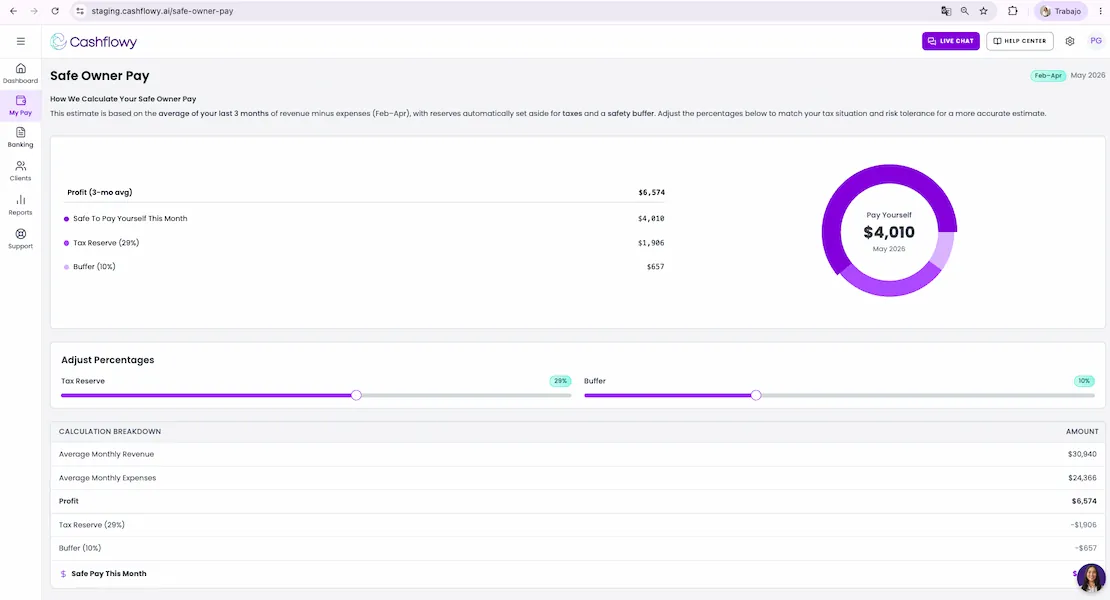
A large project payment can make your bank balance look wide open, even when much of that money is already spoken for. Cashflowy subtracts expenses, tax allocation, and your buffer, then suggests an amount you can safely transfer to yourself.
See slower months before they arrive
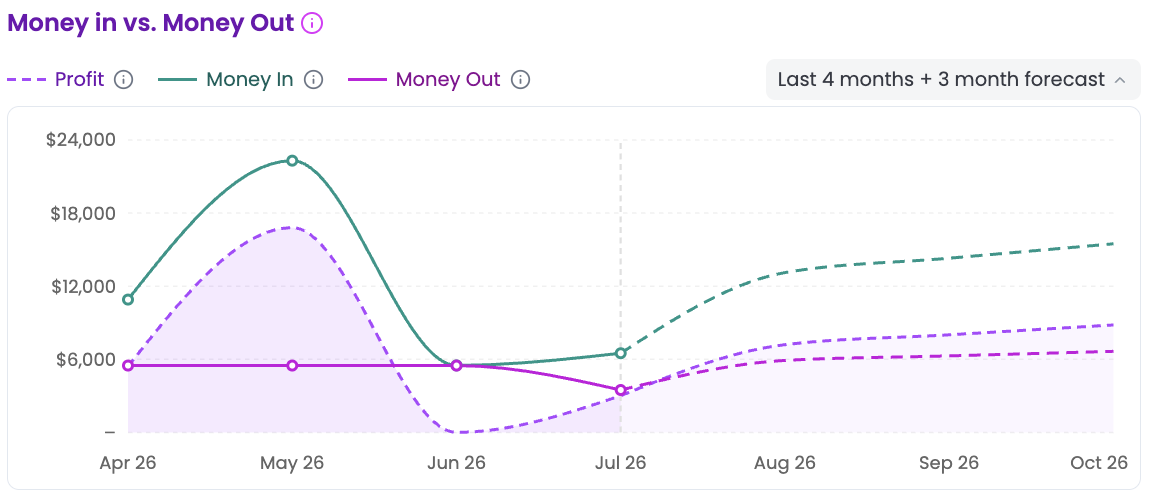
Freelance income rarely follows the same pattern every month. Cashflowy uses your latest income and spending patterns to help you see how your cash position may develop over the next 90 days.
Prepare for taxes as client payments arrive
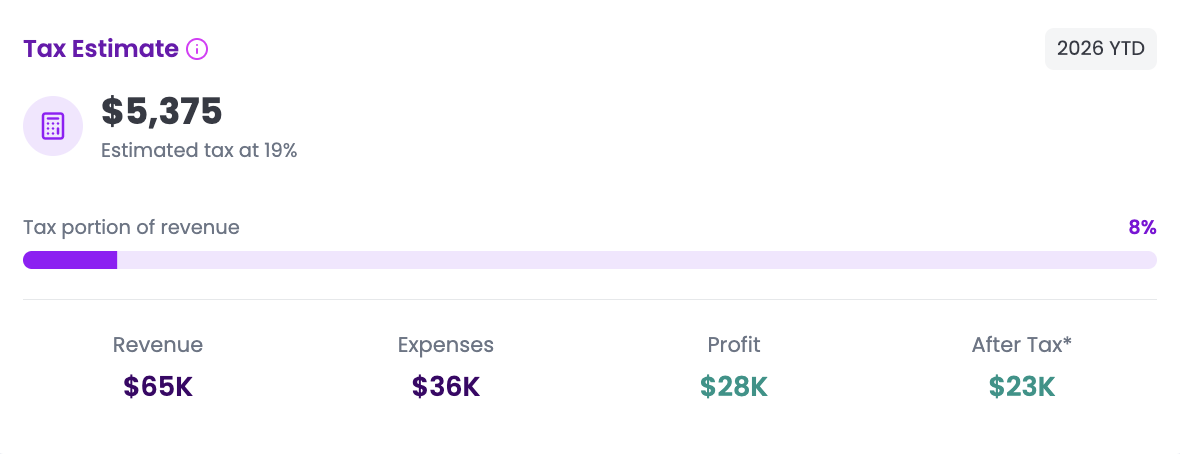
Cashflowy tracks the amount in your tax savings bucket based on your allocation settings, helping you see what you’ve put aside throughout the year, so April is never a surprise.
Cashflowy provides planning estimates and does not determine your final tax liability, prepare tax returns, file taxes, or provide tax advice. Confirm what you owe with your tax professional.
Ask the questions every freelancer asks
Cashflowy answers using your financial data, so you can make confident decisions about your freelance business.
 CashflowyKnows your numbers
Can my business survive a slow month?
From your dashboard
Example numbers, so you can see the shape of an answer. Yours come from your own accounts.
Set it up once. Cashflowy keeps your books current from there
Connect your accounts once. Cashflowy handles the routine work and gives you a current view of where your freelance business stands.
Step 1
Connect your business accounts
Securely connect bank accounts and cards through Plaid. Cashflowy imports your transactions automatically.
Step 2
Cashflowy organizes your books
It imports and categorizes client payments, subscriptions, equipment, contractor costs, and other business transactions.
Step 3
Know where your business stands
See your books, Safe Owner’s Pay, forecast, Cashflowy, and human bookkeepers in one place.
Bookkeeping software tracks your books. Cashflowy helps you run your business
| Question | Spreadsheets | Bookkeeper | Accounting software | Cashflowy |
|---|---|---|---|---|
| How much can I safely pay myself? | Do the math | Review together | Analyze reports | |
| Can I afford to take two weeks off? | Build a forecast | Review together | Limited | |
| Which expenses are reducing my profit? | Investigate | Review together | Review reports | |
| What happens if a client pays late? | Recalculate | Review together | Limited | |
| How much have I set aside for taxes? | Track manually | Review together | Check reports |
Everything you need to run your freelance business with confidence
Understand what you can safely pay yourself, plan for slower months, see where your money goes, prepare for taxes, and ask Cashflowy, all connected in one platform.
Frequently asked questions
What does bookkeeping for freelancers include?
Bookkeeping keeps your freelance income, expenses, and cash flow organized in one place, so you always know where your business stands. Cashflowy automates the routine work, from categorizing transactions to keeping your books current.
Can Cashflowy organize income from multiple clients?
Yes. Payments from retainers, milestone billing, and one-off projects are automatically categorized as they arrive in your connected accounts, organized by source without manual data entry.
Can Cashflowy show me how much cash I actually have?
Yes. Your real-time dashboard shows your current cash position, what is already committed to taxes, and what is safe to pay yourself, updated as money moves through your connected accounts.
How does Cashflowy help with variable income?
Safe Owner’s Pay and the 90-day forecast update automatically as your income and expenses change, helping you plan for slower months, busy seasons, and changing client workloads without guessing.
How does Cashflowy suggest Owner’s Pay?
Cashflowy estimates how much you may safely transfer to your personal account after accounting for business expenses, estimated tax allocation, and your business buffer.
Are human bookkeepers included?
Yes. Cashflowy automates routine bookkeeping, and real human bookkeepers are available whenever you need extra help, at no additional cost.
Your financial data stays secure
Cashflowy is built on the same security standards used by the largest financial institutions.
Secure bank connections
Read-only access through Plaid. Cashflowy never stores your bank credentials.
See integrations →AES-256 & TLS 1.3 encryption
Your financial data is encrypted with AES-256 at rest and TLS 1.3 while it’s transmitted.
Your data stays private
Cashflowy never sells your data or shares your financial information with companies like OpenAI.
Real human support
Cashflowy handles the routine work. Real human bookkeepers are included whenever you need help.
Meet your bookkeeper →