
Financial reports
How to create a Profit & Loss Report

CEO · Sep 11, 2025
Heidi DeCoux is the founder of Cashflowy, an AI-powered bookkeeping platform, and has worked with thousands of self-employed professionals to simplify finances and improve profitability.

You’ve got money coming in, bills going out, and a gut feeling your business is doing “okay.” But if someone asked you exactly how much profit your business made last month (after expenses) would you know, or would you guess based on your bank balance?
That’s where a Profit & Loss report (also called an income statement) saves the day. This simple but powerful financial report shows your business income, expenses, and net profit over a specific period, so you know if you’re actually making money or just moving it around. And here’s the best part: creating a P&L report doesn’t require an accountant or complicated software; you can build one in Google Sheets in under 20 minutes.
In this guide, we’ll explain what a P&L report is in plain language, why it’s important for solopreneurs, and how to create and update yours, plus how Cashflowy can generate your P&L instantly so you can skip the manual work altogether.
TL;DR: What You’ll Learn in This Profit & Loss Guide
- What a Profit & Loss report is (a.k.a. income statement) and how it works for solopreneurs.
- Why a P&L is important for tracking business income, expenses, and net profit.
- Step-by-step instructions to create a Profit & Loss report in Google Sheets from scratch.
- Daily update tips so your P&L always reflects your current business finances.
- Common mistakes solopreneurs make when tracking profit and expenses and how to avoid them.
- How Cashflowy can generate an instant Profit & Loss report with zero manual data entry.
What’s a Profit & Loss Report? (Plain English)
A Profit & Loss report (also called an income statement) is basically your business scoreboard. It shows:
- Money in (revenue)
- Money out (expenses)
- What’s left over (profit)
Think of it like a monthly “am I actually making money?” check. Instead of guessing based on your bank balance, it spells it out clearly:
Revenue – Expenses = Profit (or Loss).
Why It’s Important for Solopreneurs
When you’re running your business solo, you are the finance department. A P&L report helps you:
- Spot profit leaks – See where money is going (subscriptions, tools, etc.).
- Plan for taxes – Know how much you really made after expenses.
- Decide with confidence – Whether you can hire help, invest in marketing, or give yourself a raise.
- Track progress over time – Compare months/years to see growth patterns.
Without it, you’re making business decisions blind, and that’s risky.
Balance Sheet vs Profit & Loss Report: What’s the Difference?
A Profit & Loss (P&L) report is your business’s scoreboard over time: it shows money coming in, money going out, and whether you made a profit or loss during a set period.
A Balance Sheet is a snapshot of your business’s financial position at a single moment: it shows what you own, what you owe, and what’s left over for you.
They work best together: one shows where you stand, the other shows how you got there.
Want the full breakdown? Read our in-depth guide to Balance Sheets vs Profit & Loss Reports
How to Create a P&L Report in Google Sheets (Step-by-Step)
Step 1 – Set up your categories
Open a blank Google Sheet and create these headers:
- Date
- Description
- Category (Income, Expense)
- Amount
Step 2 – Separate income and expenses
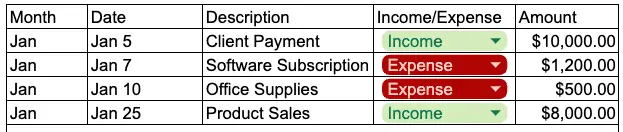
- Income: client payments, product sales, affiliate income, etc.
- Expenses: software, marketing, contractors, office supplies, etc.
Step 3 – Add totals for each month
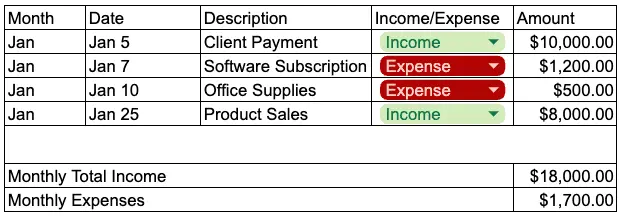
- Create a Monthly Income Total cell: =SUMIF(CategoryRange,"Income",AmountRange)
- Create a Monthly Expense Total cell: =SUMIF(CategoryRange,"Expense",AmountRange)
Step 4 – Calculate profit
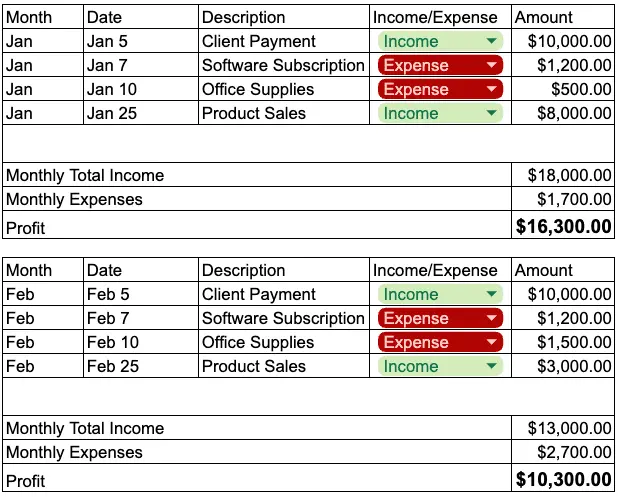
- Formula: =MonthlyIncome - MonthlyExpenses
Step 5 – Format for clarity
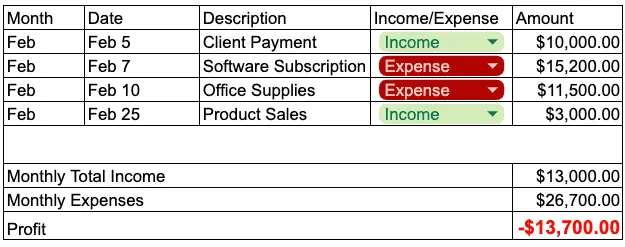
- Use bold and color for profit totals (green if positive, red if negative).
Step 6 – Add a summary table
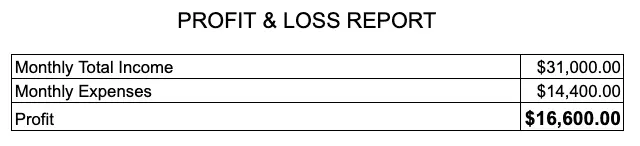
At the top of your sheet, make a small box that shows:
- Total Income
- Total Expenses
- Profit (or Loss)
How to Keep Your P&L Updated Daily
- Set aside 5 minutes at the same time every day (morning coffee works great).
- Log all transactions from the last 24 hours.
- Check receipts and bank statements to keep them accurate.
- Color-code income vs. expenses for quick scanning.
- At the end of the month, copy totals into a “Monthly Summary” tab to track trends.
Why Manual P&L Reports Get Annoying Fast
- You have to remember to log every single transaction.
- Formulas can break if you change anything.
- It’s easy to fall behind and then spend hours catching up.
How Cashflowy Makes It Instant
With Cashflowy, you skip all of that:
- Automatic P&L reports – See your revenue, expenses, and profit in seconds.
- No manual entry – Cashflowy syncs with your transactions automatically.
- Smart categories – Expenses are organized so you can actually use the data.
- Profit insights – Get tips from your Financial Coach on how to increase your profit.
It’s your P&L without the spreadsheets, the manual entries, or the stress.
Frequently Asked Questions
What is a Profit & Loss report in simple terms?
Why is a P&L report important for solopreneurs?
How do I create a P&L report for my small business?
How often should I update my Profit & Loss report?
Can I use Google Sheets to make a P&L report?
What’s the difference between a P&L report and a balance sheet?
How can I make a P&L report faster?
Can a Profit & Loss report help me get paid faster?
Does Cashflowy generate Profit & Loss reports?
Why use Cashflowy instead of a spreadsheet for P&L?
Keep reading

Cash Flow Management for Self-Employed Owners: A Real System

7 Ways to Stay on Top of Your Finances as a Solopreneur

What Is a Profit and Loss Statement? A simple Guide
Not sure what a profit and loss statement is or how to read one? This plain-English guide breaks down the P&L for freelancers, solopreneurs, and small business owners who want to actually understand their numbers.