> ## Documentation Index
> Fetch the complete documentation index at: https://cashflowy.ai/docs/llms.txt
> Use this file to discover all available pages before exploring further.
# Journal Entries
> Create double-entry bookkeeping journal entries for adjustments, transfers, and non-cash transactions.
Journal entries are the foundation of double-entry bookkeeping. Each entry has at least two lines - a **debit** and a **credit** - that must balance.
## When to use journal entries
* **Depreciation** - recording asset depreciation over time
* **Accruals** - recognizing revenue or expenses before cash changes hands
* **Owner equity** - recording owner contributions or draws
* **Adjusting entries** - month-end or year-end corrections
* **Inter-account transfers** - moving money between accounts in your chart of accounts
For most day-to-day transactions, you won't need journal entries. They're primarily for accounting adjustments. If you're not sure, [book a call with a bookkeeper](/getting-started/book-a-bookkeeper).
## How to create a Journal Entry
From a transaction:
* Go to **Banking → Transactions**
* Click the **+ Add Transaction** button at the top right
 * Select **Add Journal Entry** from the dropdown
 * Enter the **Transaction Date** and **Journal Description** (required, up to 255 characters)
* For each line, select a **Bank Account** or **Category**, then enter either a **Debit** or **Credit** amount
* Click **+ Add Line** to add more rows as needed
* Confirm **Total Debits** equals **Total Credits** - the Save button stays disabled until balanced
* Enter the **Transaction Date** and **Journal Description** (required, up to 255 characters)
* For each line, select a **Bank Account** or **Category**, then enter either a **Debit** or **Credit** amount
* Click **+ Add Line** to add more rows as needed
* Confirm **Total Debits** equals **Total Credits** - the Save button stays disabled until balanced
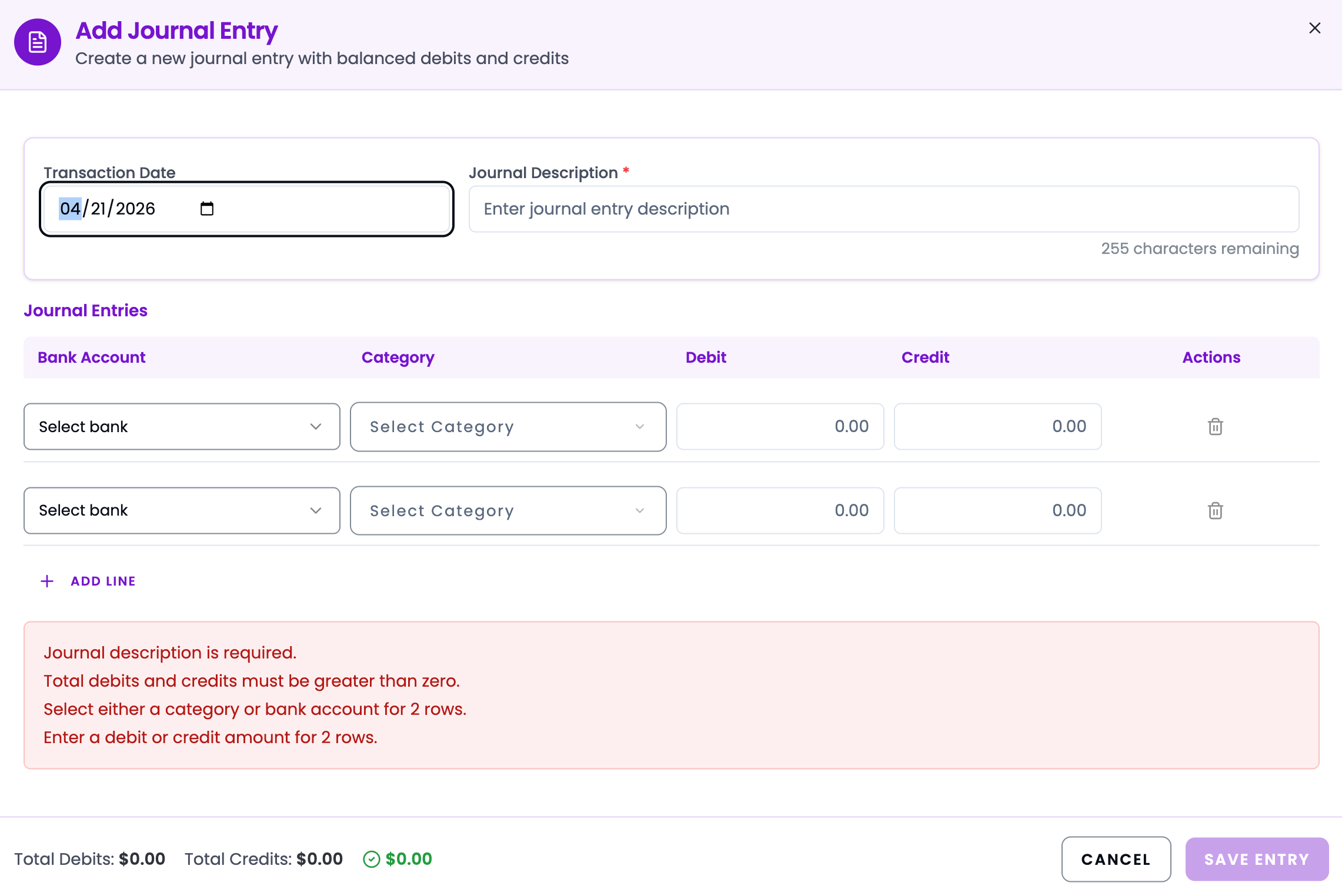 * Click **Save Entry**
## Example entries
| Account | Debit | Credit |
| -------------- | -------- | -------- |
| Bank Account | \$10,000 | |
| Owner's Equity | | \$10,000 |
| Account | Debit | Credit |
| ------------------------ | ----- | ------ |
| Depreciation Expense | \$200 | |
| Accumulated Depreciation | | \$200 |
| Account | Debit | Credit |
| ------------------- | ------- | ------- |
| Accounts Receivable | \$1,500 | |
| Revenue | | \$1,500 |
Every journal entry **must balance** - total debits must equal total credits. Cashflowy will prevent you from saving an unbalanced entry.
* Click **Save Entry**
## Example entries
| Account | Debit | Credit |
| -------------- | -------- | -------- |
| Bank Account | \$10,000 | |
| Owner's Equity | | \$10,000 |
| Account | Debit | Credit |
| ------------------------ | ----- | ------ |
| Depreciation Expense | \$200 | |
| Accumulated Depreciation | | \$200 |
| Account | Debit | Credit |
| ------------------- | ------- | ------- |
| Accounts Receivable | \$1,500 | |
| Revenue | | \$1,500 |
Every journal entry **must balance** - total debits must equal total credits. Cashflowy will prevent you from saving an unbalanced entry.